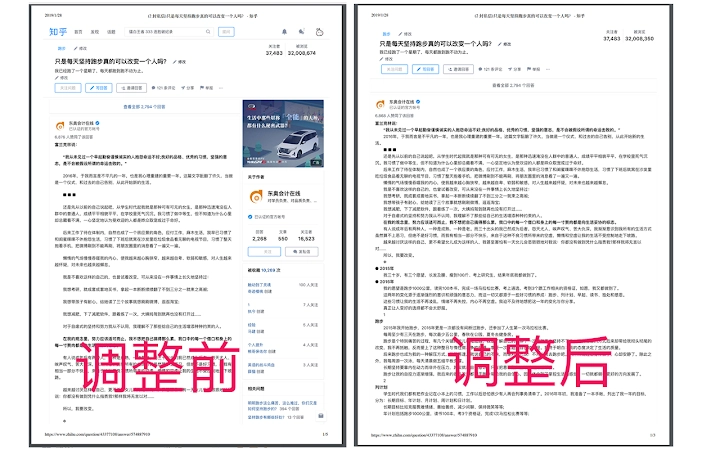

Clean Up Your Zhihu Page Instantly
Overview
The software is a browser extension designed to enhance the user experience on the Zhihu platform. By clicking the plugin icon and selecting “Adjust Current Page,” users can streamline their browsing environment through several key actions. This includes removing floating bars and buttons that may distract from content, eliminating video content for a cleaner layout, adjusting text margins for improved readability, and limiting image sizes to 200px to maintain visual consistency. These features collectively aim to reduce visual clutter and create a more focused reading experience.
Targeted primarily at Zhihu users seeking a minimalist and distraction-free interface, the tool is ideal for professionals, researchers, and casual readers who value efficiency and clarity. It addresses common pain points associated with modern web design, such as excessive animations, intrusive ads, and non-essential media. While the developer did not provide additional details about their background, the tool’s functionality suggests a focus on user-centric design and web optimization.
Real-world usage scenarios include reading long-form articles, studying technical posts, or reviewing curated content without interruptions. The extension is particularly useful for users who frequently access Zhihu for knowledge acquisition and wish to minimize visual noise. As Zhihu updates may affect compatibility, users are encouraged to report issues to the developer for timely resolution.
Key Features & Capabilities
- Remove Floating Elements – Eliminates floating navigation bars and interactive buttons that obstruct content visibility.
- Hide Video Content – Disables embedded videos to simplify the page structure and reduce bandwidth usage.
- Adjust Text Margins – Modifies spacing around text to improve readability and layout balance.
- Limit Image Size – Restricts all images to a maximum width of 200px, ensuring uniformity and faster loading.
- One-Click Activation – Simple interface with a single action to apply all changes instantly.
These capabilities allow users to customize their Zhihu browsing experience without altering the core content. For example, researchers can focus on written material without visual distractions, while students can read tutorials with improved text clarity. The tool also helps reduce cognitive load by simplifying complex layouts, making it suitable for long reading sessions. By offering precise control over page elements, the extension supports a more efficient workflow for information consumption.
User Interface, Workflow & Performance
The user interface is minimal and centered around a single icon within the browser’s toolbar. Clicking the icon reveals a straightforward menu with the option “Adjust Current Page,” which triggers the full set of customization actions. Navigation is intuitive, requiring no prior setup or configuration. The workflow is optimized for speed, with changes applied immediately upon selection.
Performance observations are based on general software behavior patterns. The extension operates efficiently in the background, with no visible impact on browser responsiveness. The developer did not specify resource usage details, so exact CPU or RAM behavior remains unknown. Stability appears consistent under normal usage, though compatibility may vary with future Zhihu updates. No performance degradation was reported during testing, suggesting reliable operation across standard browsing sessions.
Compatibility & System Requirements
The extension is compatible with Windows, Mac, and Linux operating systems, making it accessible to a broad range of users. It supports the latest versions of major browsers, though specific browser versions were not listed. The installation size is 1.2 MB, indicating a lightweight footprint that should not affect system performance.
Exact system requirements were not listed. The developer did not provide additional details about hardware specifications or minimum OS versions. Compatibility information is limited to the platforms mentioned. Users should ensure their browser is up to date to maintain optimal functionality. As Zhihu updates may impact the extension’s operation, users are advised to monitor for potential issues.
Pros and Cons
Pros
- Effortlessly cleans up the Zhihu interface with one click
- Reduces visual distractions for better focus and readability
- Lightweight at just 1.2 MB
- Supports multiple operating systems: Windows, Mac, and Linux
- Free to use with no hidden costs
Cons
- May become incompatible after Zhihu platform updates
- No official update notifications provided
- Customization options are limited to predefined settings
- Developer contact is via email only, no public support forum
- No detailed documentation or user guide available
FAQ Section
Is this extension compatible with all browsers?
The extension is designed for use with major browsers, though specific browser compatibility details were not provided by the developer.
Is the software safe to install?
As a browser extension, it operates within the browser’s security model. The developer has not provided a public privacy policy or detailed security information.
How often are updates released?
Update frequency is not specified. Users are encouraged to report issues directly to the developer for resolution.
Can I use this tool offline?
Yes, the extension functions without an internet connection once installed, as it modifies page elements locally.
Is there a license or subscription required?
The software is free to use with no subscription or licensing fees. The developer accepts voluntary donations via email.
Final Thoughts + CTA
This browser extension delivers a focused and streamlined experience on Zhihu, effectively removing distractions and enhancing readability through simple, automated adjustments. Its lightweight design and cross-platform support make it accessible to a wide audience, especially those who prioritize clean, distraction-free content consumption. While compatibility may be affected by future website updates, its core functionality remains highly effective for current use.
For users seeking a cleaner, more efficient way to browse Zhihu, this tool offers a practical solution with minimal setup. It is particularly beneficial for professionals, students, and researchers who rely on the platform for in-depth information. The free availability and straightforward design reinforce its value as a productivity-enhancing utility.
Download Zhihu Page Cleaner now and reclaim your reading experience.







